Code Classroom Adds Scratch-Based Blocks Alongside Python and Web Editors
- Published
- Author
- Mel Farrington
- Reads
- 921
Code Classroom now combines drag-and-drop blocks, Python, and HTML/CSS in a browser-based platform with class management and Google Classroom integration.
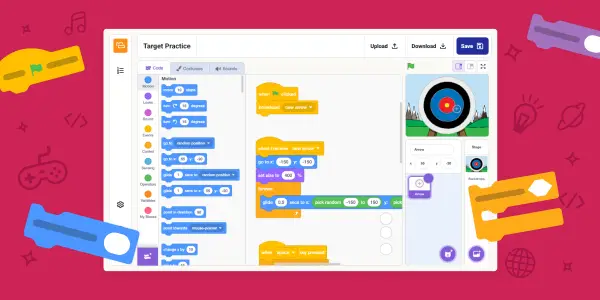
Code Classroom now brings block-based programming into the same browser platform as its Python and web editors. The new Blocks editor is based on the open-source Scratch editor, giving teachers a way to introduce programming concepts through drag-and-drop while keeping text-based coding tools available in the same classroom environment.
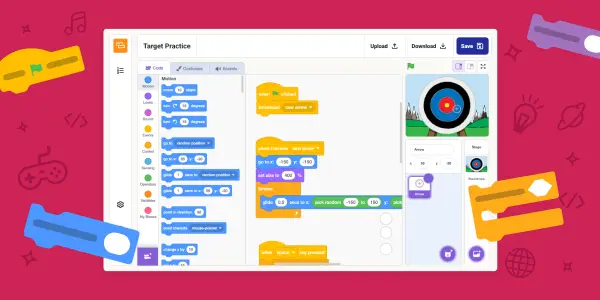
That combination is the practical change: learners can begin by arranging visual blocks to make games, stories, and animations, then use the platform’s Python editor or build web pages with HTML and CSS. The tools sit alongside class setup, work assignment, and learner progress tracking. For schools already using Code Classroom, the new editor adds another teaching format within a platform used by more than 4,500 schools.

One platform, three programming environments
The Blocks editor is designed for learners who are not yet ready to type code. They assemble coloured blocks to express program instructions, which lets them work on the logic of a program without first needing to learn the syntax of a text-based language. The stated projects include games, stories, and animations.
Python provides a text-based route within the same platform. Learners can start with a first program and build toward writing and understanding code. The Web editor covers another set of skills: creating web pages using HTML and CSS. Taken together, the three editors give teachers options for different levels of experience and different kinds of programming work.
Keeping these environments together may make it easier to support a class with mixed experience. A teacher can introduce programming with blocks, while also having Python and web development tools available for learners ready to work with typed code. The announcement doesn’t specify a required progression between editors, so schools can choose how to use each one in their lessons.
Designed around classroom management
Code Classroom includes tools to create classes, assign work, and track learner progress. Those features sit alongside the coding editors, keeping routine classroom tasks within the same platform. It runs in a browser and requires no software installation, according to its description; teachers can set up classes and add students without arranging local software management.
The platform also integrates with Google Classroom. Teachers can import existing classes, and students can use Google single sign-on. These connections are intended to reduce repeated setup and make access easier to manage. The announcement gives no technical details about supported accounts, browser requirements, or how imported class data is handled, so schools evaluating the integration will need to check those details for their own setup.
Code Classroom is described as free to use, with no subscription or hidden costs. Its maker also describes it as private by default and designed for schools. No further privacy or data-retention specifications are provided in the announcement, so those claims don’t establish how particular data is stored or managed.
Teacher feedback points to broader use
Early responses from teachers highlight the value of bringing several programming approaches together. A UK computer science teacher said the combination of Scratch, Python, HTML, and CSS in one platform could be “hugely transformative for schools.” Bartholomew Owuor, a computer science teacher at Cathsam School in Kenya, said the coding blocks helped him include learners across a wider range of ages.
Those comments suggest why blocks may be useful in a school setting: visual programming can give younger or less experienced learners an entry point, while the Python and web editors remain available for other lessons and skill levels. The platform’s design also lets teachers manage those activities within a shared class environment.
Code Classroom’s features, including the Blocks editor, are also available through Experience CS. For schools considering the addition, the key question is how the three editors fit their teaching sequence and student needs. The new option expands that choice while keeping class management, browser access, and the existing text-based editors in the same place.