Home Assistant Connect AUX-2: Audio, Bluetooth and Serial Control for $69
- Published
- Author
- Dennis Knake
- Reads
- 454
The $69 AUX-2 combines network audio, Bluetooth proxying and two serial ports, but its usefulness depends on compatible devices and integrations.
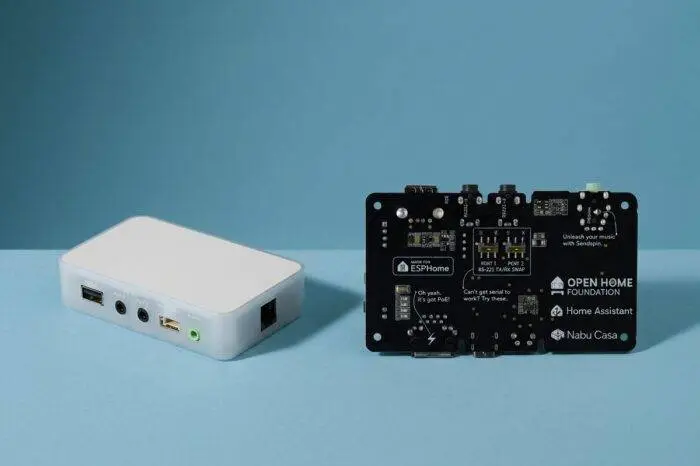
Home Assistant Connect AUX-2 puts four functions in one small networked box: audio output for Music Assistant, a Bluetooth proxy, two RS-232 ports and a USB connection for a Z-Wave stick. At $69 (€59), it packages capabilities that Home Assistant users could previously assemble with their own ESPHome hardware. Its appeal depends on whether several of those functions are useful in the same location. Music playback and Bluetooth relaying have drawn positive early reports, while serial control remains much less proven.

Nabu Casa introduced the AUX-2 on November 11. The company says it began as an enclosure for putting its ZWA-2 and ZBT-2 radio sticks on the network through Power over Ethernet (PoE), which carries data and power on one cable. Since PoE accounted for much of the hardware cost, Nabu Casa says it added ports and other functions with a relatively small effect on the price. XDA Developers reports that an ESP32-S3 running ESPHome firmware handles the device’s functions inside.
Hardware and setup
The AUX-2 measures 106 × 63 × 25 mm. Its audio conversion uses a Texas Instruments PCM5122, while a W5500 controller handles Ethernet. Wi-Fi is limited to 2.4 GHz; connecting an Ethernet cable switches Wi-Fi off. The box draws no more than one or two watts, according to Nabu Casa, and ships without a power supply or cables.
Setup appears to be one of its stronger points. In Matter Alpha’s PoE test, Home Assistant discovered the device quickly, and adding it took about 30 seconds. Without Ethernet, initial setup runs over Bluetooth, using the Companion app or a nearby Bluetooth proxy. There’s a 15-minute window after power-up to complete that process. Home Assistant also handles updates as it does for other ESPHome devices.
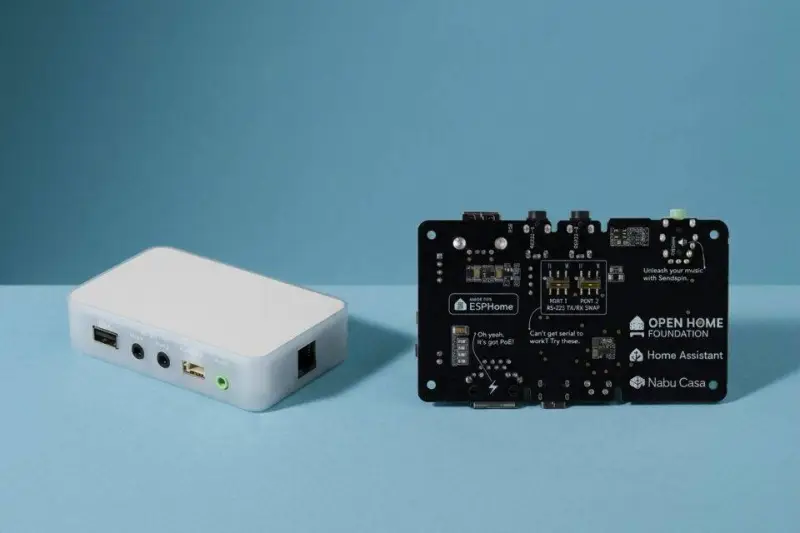
The Bluetooth proxy relays signals from Bluetooth Low Energy devices to Home Assistant. XDA reports support for up to three active connections; passive sensors that only broadcast data don’t count toward the limit. In smart-live.net’s test, the AUX-2 detected more devices than the other proxies in that home. That result suggests placement could matter: a proxy can be positioned where radio coverage is useful instead of leaving Bluetooth reception dependent on the Home Assistant server’s location.
The USB port can host a ZWA-2 Z-Wave stick, moving the radio connection to wherever the AUX-2 has a suitable network connection. Felix Frank of Caschys Blog reports that the stick paired at the push of a button and then behaved as though it were plugged directly into a Home Assistant Green. Zigbee with the ZBT-2 also works, although Nabu Casa hasn’t promoted that use and was seeking testers. Thread isn’t supported because the protocol is sensitive to network delays. The single USB port can serve only one device at a time.
Music playback: synchronized, with some delays
For audio, the AUX-2 uses Sendspin, an open protocol from the Open Home Foundation for synchronized multiroom playback across a local network. Music Assistant supplies music from streaming services or a personal library. The box provides an output for a stereo, AV receiver or active speakers, turning that equipment into a Music Assistant player.
Early listening tests found the AUX-2 playing in sync with several kinds of equipment. XDA Developers paired an older Huawei speaker with a Sonos Era 100. Caschys Blog reports synchronized playback across Sonos speakers, a HomePod and the AUX-2. The box itself doesn’t coordinate the group; Music Assistant does that work and brings AirPlay and Cast speakers into the setup through bridges. XDA describes Chromecast support as experimental.
A multiweek test by Matter Alpha adds useful qualifications. Playback often took a while to start, and grouping or ungrouping speakers felt slower than with AirPlay. Once playback was underway, though, the speakers stayed synchronized without a noticeable offset. That distinction matters in day-to-day use: stable playback after startup doesn’t remove the wait when beginning a session or changing groups.
Connection type also affected the experience. Matter Alpha found Ethernet substantially more reliable than Wi-Fi, particularly with FLAC files. The reviewer attributed the wireless results to a busy radio environment and the ESP32-S3’s older Wi-Fi standard. For installations that need Wi-Fi, the ESPHome configuration can switch audio to Opus, a codec that requires less bandwidth.

The same reviewer preferred the digital audio output, reporting better sound and fewer issues from loose plugs or poor grounding. The digital path uses mini-TOSLINK, a smaller optical connector. Neither output turns the AUX-2 into a standalone player for common phone or smart-speaker apps: playback is managed through Home Assistant and Music Assistant. It isn’t a Spotify Connect or Google Cast target, a dependency XDA identifies as a significant limitation.
Serial control depends on the device and integration
The AUX-2’s two RS-232 ports are its most distinctive addition to a multiroom audio device. Nabu Casa lists TVs, AV receivers, projectors, uninterruptible power supplies, climate equipment and Modbus devices as possible uses. The practical requirement is twofold: the target needs a suitable serial interface, and its Home Assistant integration must support a serial connection through the network proxy. If both conditions are met, the two ports can control two RS-232 devices at once.
RS-232 specifies electrical signaling, not a single connector type. The AUX-2 uses 3.5 mm jacks, so many installations require an adapter to DB9, RJ45, RJ9, mini-DIN or screw terminals. AV receivers and projectors often use a nine-pin DB9 connector marked RS-232C. TVs may instead have a 3.5 mm jack labeled RS-232C or SERVICE; Samsung uses the EX-LINK label. Use a three-conductor stereo plug where required, since a mono plug lacks the necessary contacts.
Transmit and receive wiring can differ by device maker, so each AUX-2 port has a switch on its underside. Nabu Casa’s documentation specifies the factory switch position for Samsung TVs and the alternate position for LG sets. Some TV interfaces also need to be enabled in a service menu. On compatible LG models, that setup step may be necessary before control works.
Port availability varies by model. Home Assistant’s documentation says many entry-level LG TVs have lacked serial ports since 2018. For Samsung, models from the Q70 series upward have a dedicated jack, according to the integration documentation. The 8000 and Q60 series require a proprietary USB dongle and two service-menu settings. Many TVs also ignore power-on commands while in standby, so finding a serial port doesn’t by itself guarantee the desired control.
Home Assistant has an official Denon integration for AV receivers. Nabu Casa points to community-maintained integrations for Arcam devices, Nuvo amplifiers, BenQ projectors, and NAD T755 and T757 receivers. The integration landscape matters because an RS-232 connector alone won’t make a device controllable through the AUX-2.
Modbus introduces another compatibility boundary. Some solar inverters, heat pumps and ventilation units use Modbus, commonly over RS-485, a serial bus that can connect multiple devices. The AUX-2 needs an additional adapter, either an RS-232-to-RS-485 converter or a USB dongle. Even then, the integration must offer a serial connection. A Modbus hub configured manually in YAML can’t use the proxy, and integrations that connect only over the network—such as Fronius, KACO Modbus and STIEBEL ELTRON—gain no benefit from the box.
Serial testing has yet to establish a clear track record
By November 13, only one of four reviews examined serial control. Matter Alpha didn’t have a suitable device, XDA concentrated on audio, and Caschys Blog tested Z-Wave and music. Udo Berndt of smart-live.net tried the AUX-2 with a 2018 Samsung 8000-series TV. That model lacks an EX-LINK jack and needs Samsung’s USB dongle. Berndt couldn’t locate the part or identify a seller.
He then tried a third-party cable marketed for Samsung EX-LINK, with an FTDI USB-to-serial converter. After enabling EX-LINK and USB Serial in the TV’s service menu, he tested both TV USB ports, both AUX-2 switch positions and both generation settings in the integration. The TV didn’t respond. Berndt suspected the cable rather than the AUX-2, but the test didn’t resolve the cause. It does show why buyers should confirm the TV’s interface and integration support before relying on the box for control.
Output limits and installation details
The AUX-2 has no audio input, so it can’t accept a turntable, CD player or cassette deck. It has one audio output path, selectable between analog and optical; the two can’t operate at once. Both are limited to 16-bit/48 kHz, according to XDA. The analog output is for line-level equipment, such as a stereo, receiver or active speaker. There’s no amplifier, so passive speakers need a separate one.
Bluetooth audio and infrared control aren’t supported. Nabu Casa has said it plans separate hardware for infrared and RF. Another installation detail deserves care: the three jacks look alike, but the serial ports carry ±5 volts and can damage audio equipment. A factory-applied sticker is intended to help prevent a cable being plugged into the wrong jack.
Product imagery has also caused confusion. A user report on GitHub criticized a product-page image showing a vinyl record because it could suggest an audio input; the FAQ clarifies that the AUX-2 only outputs audio. The distinction is practical: music reaches it over the network, typically from Music Assistant using Sendspin, then leaves through a stereo or speaker connection.
There’s also a question of whether multiple functions will be used in one place. Frank of Caschys Blog points to a possible mismatch: a home might need serial access by a basement inverter and audio output in a living room. If each location calls for its own box, some of the ports and functions may go unused.
When the $69 package makes sense
For music alone, a lower-cost ESP32 running Sendspin firmware can do the job. Matter Alpha names the Apollo CAST-1 at $35 and Voice Preview Edition at $59 as alternatives. Since Home Assistant 2026.5, ESPHome devices can also share serial ports over the network, so the AUX-2 isn’t the only route to serial proxying.
The value is in having several functions ready in one enclosure, with PoE, Home Assistant-managed updates and no need to build or maintain a custom ESPHome device. That package is most compelling where at least two jobs overlap: for example, a receiver with an RS-232 port near an existing network cable, or a central location where a Z-Wave stick needs better coverage and a Bluetooth proxy is useful.
For tinkerers, the bootloader is unlocked and the firmware is available on GitHub. The first custom firmware installation must be done over USB. That leaves room to adapt the device, while keeping the initial setup approachable for people who want the supplied functions as configured.
The AUX-2’s strongest case is convenience when its audio, radio and serial roles converge. Its music performance looks promising once playback starts, though Ethernet appears preferable for demanding files. Serial control could make the box more useful in equipment rooms and media setups, but the compatibility chain is specific and the early hands-on evidence is thin. Check the target device’s port, cable requirements and Home Assistant integration before treating serial control as part of the purchase case.